Microformats Buttons
There have been requests for buttons for various microformats. Either badges, or buttons that do something with the specific microformats. This page keeps a list of buttons, and requests as well. - Tantek
Licensing
If you add links to buttons you have designed, please
- upload them to this wiki to guard against ending up with tons of broken images on this page
- also include a statement that you do one of the following:
- release them into the public domain
- hold copyright, but release all rights as to it use
- license them under a specified free license, e.g. consider using a Creative Commons license, such as cc-by-3.0.
Thank you.
- Images below hosted at boogdesign.com are available under CC Attribution 2.0 License, see my buttons page for the Photoshop files if you need them. - Rob Crowther
- Images below hosted at rbach.priv.at are available under cc-by-3.0 license. - Robert Bachmann
- Images below hosted at hauntedpalace.net and flickr.com/photos.hauntedpalace (POSH logos and palette cheatsheet) are available under the Creative Commons Attribution-ShareAlike 3.0 license. — Carla Hufstedler
Buttons
Microformat Button
Simple microformats logo-text:
small transparent PNG:

large transparent PNG:

See spread-microformats for SVG and more.
I've made a button for microformats. Since there are so many microformats and with more to come, just indicating support/ use of might be a good generic approach. The image is free to use. Please copy it to your own hosting account and not link to it.
I already have a "I use" on my blog: http://doncrowley.blogspot.com/
- Don Crowley
 - by aaronpk, released under public domain


hCalendar


- CSS-powered button from Midgard CMS - Event calendar:
››› hCalendar
Code (white space added for readability):
<span class="badge"
style="float: left; font: 9px Geneva, Verdana, sans-serif; padding: 0 1em 1px 0;
border: 1px solid #000; background: #D1940C; color: #fff; text-decoration: none;
text-align: center;">
<span style="background: #000; border-right: 1px solid #000; color: #fff; padding: 1px 0.75em;
margin-right: 0.1em;">
›››
</span>
hCalendar
</span>
hCard
 (mirror:
  )
)

- CSS-powered button, as evidenced at microformat badges @ re-run

rel-license


rel-nofollow


rel-tag


VoteLinks


XFN


XMDP


XOXO


CSS Styles for microformats
I'm not sure wether this can be under buttons, but I don't know where else to put it. This is a stylesheet containing styles for most microformats. And, it's automatic. I release it under the cc by-sa. Please note that I am new to microformats, and if you can improve this, please do. Mac Lover 13:25, 13 Apr 2007 (PDT)
CSS Buttons
As there are new microformats happening all the time I set about making a CSS button that looks like the handmade versions. This is the result.
The file with the CSS and the two images required (logo and background) can be downloaded from The Beastly Beasts.
Extract the microformat directory and the files in it to /css so that you have:
/css/microformat/microformat.css
/css/microformat/background.png
/css/microformat/logo.png
If your paths are different a bit of editing is needed.
The XHTML to create a button is:
<tag class="microformat-button microformat-type"><span></span>microformat-type</tag>
For example, an hCard button with a link to the spec:
<a href="http://microformats.org/wiki/hcard" title="Microformat enabled" class="microformat-button hcard"><span></span>hcard</a>
Buttons for draft formats
These may be subject to change if the names of the formats change when they are released.
adr

geo

hAtom

hResume


hReview

rel-directory

rel-enclosure

rel-home


rel-payment

Robots Exclusion

xFolk

Make your own buttons
Style 1
Example:
Use the Kalsey Button Maker with the following settings:
- Outer border: #666666
- Inner border: #ffffff
- Bar position: 25 pixels from the left
- Left box text: >>>
- Left box background: #000000
- Left box text color: #ffffff
- Left box text start: 7 pixels from the left
- Right box text: (The name of the microformat goes here)
- Right box background: #31757b
- Right box text color: #ffffff
- Right box text start: 3 pixels from the bar
Style 2
Example:
- Get the font Silkscreen
- Install ImageMagick
- Get the blank icon (
 )
) - Type:
convert blank.png
 -fill white
 -font Silkscreen
 -pointsize 8
 +antialias
 -draw "text 28,10 'button label'"
 output.png
Microformats Logos
Rohit is a very poor CSS hacker, but gave it his best shot. He also rendered it at 72 and 18 points.

microformats
Palette
I created a cheatsheet using Big Huge Lab's Badgemaker:
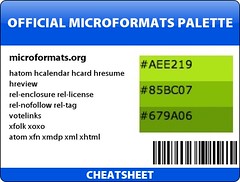 --Carla 12:11, 1 Sep 2007 (PDT)
Wiki buttons
For use on this wiki.
- new! - {{NewMarker}}
- Success! - {{SuccessMarker}}
- updated! - {{UpdateMarker}}
Requests
- Logos for all microformats
- When someone has time, these should be repeated on the page for each respective format.
See also
- 2D Barcodes (barcode-like graphic for mobile device input)
- buttons
- icons
- stickers
- POSH logos and buttons